


Announcement: Pleco - the open-source Kubernetes and Cloud Services garbage collector


Why did we create and open-source Pleco?
"The Qovery team is super excited to offer Pleco to the open-source community. A tool that saves us tons of time and money in the Cloud. Especially in the Cloud, where forgetting to stop a resource can cost an arm and a leg" - Pierre Mavro - CTO and co-founder of Qovery
At Qovery, we provide a product that helps developers to deploy their apps in the Cloud. Behind the scene, we deploy and manage Kubernetes clusters on the cloud account of our customers. To make our product reliable for our users, we need to permanently run thousands of tests in the Cloud. Running tests mean that we can have dangling resources that are running because of testing failure. At the beginning of Qovery (2 years ago), we cleaned up those dangling resources manually. It was unreliable and a complete loss of time and money for our team. This is where we invested in writing Pleco to make our life easier and save us from money loss.
How does Pleco work?
Pleco is an application that works with a simple command line and allows you to set many options such as:
- Cloud provider on which it acts
- How to connect to the cluster
- Duration of the interval between each check and potential cleaning
- Logger precision
- Geographical areas in which Pleco must perform cleaning
- Resource types to be cleaned
- Dry run deactivation
Example :
Here is the resources list that Pleco currently manages:
Kubernetes
- Namespaces
AWS
- Document DB databases
- Document DB subnet groups
- Document DB snapshots
- Elasticache databases
- Elasticache subnet groups
- RDS databases
- RDS subnet groups
- RDS parameter groups
- RDS snapshots
- EBS volumes
- ELB load balancers
- EC2 Key pairs
- ECR repositories
- EKS clusters
- IAM groups
- IAM users
- IAM policies
- IAM roles
- Cloudwatch logs
- KMS keys
- VPC VPCs
- VPC internet gateways
- VPC nat gateways
- VPC Elastic IP
- VPC route tables
- VPC subnets
- security groups
- S3 buckets
SCALEWAY
- Kubernetes clusters
- Database instances
- Load balancers
- Detached volumes
- S3 Buckets
- Unused Security Groups
DIGITAL OCEAN
- Kubernetes clusters
- Database instances
- Load balancers
- Detached volumes
- S3 Buckets
To manage unnecessary resources, we have thought of two approaches:
- Verify that the resource user, typically a cluster, still exists. It is possible but laborious because they have hierarchical junctions.
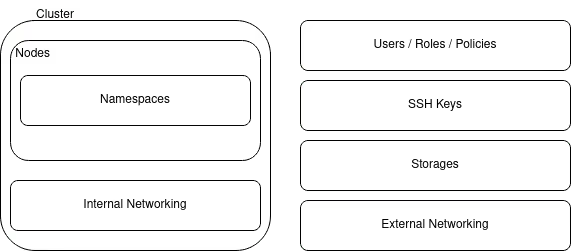
- Use a resource creation date and add a lifetime, using tags to verify its expiration over time.
Well, at Qovery, we have decided to do both simultaneously!
When Pleco is running, it uses Kubernetes API (kubectl) and the corresponding one from the cloud provider to list the resources and tags. Then it performs a comparison of resource creation date and current date based on a lifetime tag. If a resource is expired, Pleco deletes it.
If a deleted resource includes other items, then those items are also deleted.
One of the other advantages of Pleco is that it is possible, thanks to the two connection modes, to make it run within a cluster so that it self-cleans or on an external machine for remote cleaning.
To deploy Pleco, you have two options, Dockerfile or Helm chart.
Managing deployments
Different tools allow us to inject tags into different resources, a formalized creation date, a lifetime (TTL) in seconds. Although there are many resources with a creation date among the different cloud providers, we have decided to add our own to maintain consistency. With some cloud providers, we may be faced with a consistency problem, the date formats returned are not the same depending on the resources or they do not all have a creation date.
Unfortunately, not all resources support the functionality of tags and in some cases, since we can use dependencies between resources, tagging is irrelevant.
How is Pleco made?
Choice of language
Pleco is an application that the Qovery team created to answer an immediate need; therefore, we code it in Go. It is a perfect language to set up a small application, easy to use, fast build of binary files per operating system, more than acceptable performance, allowing the use of many SDKs that we need (AWS, Scaleway, Digital Ocean, k8s) and accessible asynchronous processing, thanks to goroutines.
Cluster connection
To be able to remove unnecessary namespaces, Pleco uses the Kubernetes API. This API cannot work without a configuration file. Therefore, it is possible to generate a k8s client in two ways: With an internal connection that generates a connection depending on the configuration of the cluster in which Pleco is running. With an external connection by providing the Kubeconfig ourselves.
Regarding Cloud provider API calls, Pleco requires the injection of environment variables with the credentials of the target cloud account to create a client for the API.
Resource management
Pleco can act in different geographical locations and on different resources. To be able to separate the processes, we used goroutines to manage API calls by region and by resource. A routine is created by region and for each resource inherent to this one, a routine is generated by resource.
We could have worked synchronously, but given the number of regions and resources, we chose call parallelization in order to perform processing faster at each interval.
Protection tag
Although each resource is managed with an expiration date or a dependency, it is possible to add a 3rd tag to block its deletion: the do_not_delete tag with a Boolean value. So even if the resource is expired it will never be deleted. There is another way to protect yourself from deletion, do not put a TLL tag.
Conclusion
Even if you try to manage all resources' lifetimes, sometimes it can go wrong, and you can still have useless stuff on your cloud account.
Pleco makes it easier for DevOps teams to handle unused resources, leading to issues or financial loss. It will allow developers to work without thinking about quotas or even about deleting by themself all the stuff they created, thanks to the TTL tag.
One of the other advantages of using Pleco is to force developers to use consistent tagging. It helps to organize and structure cloud accounts.
At the moment, Pleco is running on all Qovery's test cloud accounts. Since we started using it, we don't have any quotas or flaky resources issues. We also saved thousands of dollars by deleting all unused resources regularly.
Check out Pleco on GitHub - Give a star and feel free to contribute 🤩


.svg)
.svg)
.svg)

Suggested articles

Struggling with Kubernetes configuration sprawl and long deployment queues? Discover how to identify technical vs. workflow bottlenecks and why shifting to a self-service Kubernetes management platform like Qovery is the key to scaling your engineering velocity.


Following the end of maintenance of the Ingress NGINX project, we have been working behind the scenes to migrate our customers’ clusters from Kubernetes Ingress + NGINX Ingress Controller to Gateway API + Envoy Gateway.




.webp)