


Everything You Need to Know About Deployment Environments in 2023


[Last updated on 07/26/2023]
Maintaining multiple development environments offer the following benefits:
- It improves team productivity and results in faster release cycles
- There is zero downtime because development and testing environments are different from than live environment
- Multiple environments help achieve better security because you can apply tighter restrictions on live server
- It gives the ability to market your product faster
- It allows you to experiment and try different innovative ideas
The major deployment environments used in software development are production, staging, UAT, development, and preview environments (or in other words, ephemeral environments"). Let’s discuss that one by one and explore the need for each of these.
Production Environment
What is it about?
The Production environment is a live server that all customers use to perform their business activities. This is the environment where the final deployment of the product is done. This is called a “Live” environment because customers interact with it live. Usually, access to the production server is limited and highly secure.
It's not expected for a bug to be found on the production server directly; otherwise, it could impact the customer’s experience. A bug found in production is also called an “escaped defect” because it escaped from the eyes of the QA on Staging and User Acceptance Testing (UAT).
Finally, the infrastructure of this environment is resilient so that your product is always available and can tolerate any infrastructure loss.
When should we use it?
This environment is used by actual users. That’s why it is usually not created at the start of the product development, because there are no customers yet. It is only when your MVP or initial product version is ready that you create this environment to be used by actual customers.
This environment is also used where some parts of your system are exposed to be integrated by other vendors. If you make an API call to a vendor, you hit API deployed on their production server. So if you see a feature or bug fix on production, then it is safe to assume that it was tested and approved not only on the Development server and Staging server but also on the User Acceptance Testing (UAT). This environment contains the real and live data of customers.
Staging Environment
What is it about?
Before the product is deployed to production, it needs to be properly tested in a pre-production environment, more commonly known as the Staging environment. A staging server is not as stable as the production server because features and bug fixes are still under testing on staging yet.
Any bugs or new enhancements reported on the staging server are first incorporated into the development server and then moved to the staging server. You can think of it as a bridge between development and production. Mostly the staging servers are very close replicas of the production server and are sometimes considered as “pre-production”.
When should we use it?
The primary purpose of this environment is to ensure that the software has been tested enough to be deployed in a production or UAT environment. This is where Quality Assurance (QA) engineers perform proper testing and ensure that the application is working according to the stakeholders' expectations. The staging server is also used for executing performance and load testing.
User Acceptance Testing (UAT) Environments
What is it about?
After the software testing is completed on staging, it's then deployed to the UAT environment for customer testing. Software running on UAT must ensure that it is a viable product and ready for users. A UAT environment is similar to staging in terms of testing. Like staging, it is used primarily for testing bug fixes and new features. However, unlike Staging, the customer or product owner performs testing in this environment.
When should we use it?
This environment is used to evaluate whether the software running on it will be accepted by the end user, hence the name “User Acceptance Testing”. Usually, the bugs related to users’ usability are found and fixed in this environment. It's the last stage before the product goes live. After the software is approved on UAT, it's deployed to production.
Development Environment
What is it about?
The development environment is where developers develop the product and deploy their code for the first time. As developers continuously change their code to update the product, this environment is highly volatile. It is perfectly possible for this environment to be down and inaccessible for a brief period of time. This environment does not contain customer data, and it utilizes data created by developers. Branches of other developers are also merged in this environment. This environment is primarily for developers to develop, merge and test their tickets before it goes to the QA team.
Any bug fixes found on any other environment are reproduced and fixed on this environment first. New features are also developed here first and tested by developers in this environment.
When should we use it?
The development environment is the first stage when product development initiates. A product that is in maintenance mode will seldom need this environment. Whereas a product in its MVP phase will need it most, this is a perfect environment for debugging any issue and a new feature preview.
This environment also supports rapid collaboration between different cross-functional team members, e.g., initial incorporating feedback from the product owner, QA, UI designer, etc.
Preview Environments
What is it about?
Preview environments (also known as Ephemeral Environments) have disrupted the way pull requests are verified. The traditional approach is like this: After the developer pushes code in his branch, you clone that branch on your local machine, deploy the changes to your local environment, and update the external integrations and data sources. This creates many dependencies in the workflow.
Preview environments solve this problem with great simplicity. As soon as a pull request is created, an environment is automatically created with all the dependencies, including the new code, configuration, data, etc. And this environment can be accessed through a URL. That gives great flexibility to other team members to evaluate the changes in isolation without needing to make any changes to their local environment or setting up a proper staging environment. As preview environments are associated with the life cycle of the pull request, and they are destroyed as soon as the pull request is merged in master, that’s why they are called ephemeral environments or dynamic environments.
Preview environments provide lots of benefits to the business. Your release cycles are shortened because less time is spent on the preparation and deployment of a new environment. Cost is also reduced because preview environments are short-lived, and no permanent infrastructure is needed. Product quality is improved because it gives power to non-technical users such as product owners to test the functionality and provide feedback instantly. All these factors improve customer satisfaction and help you achieve your business goals faster.
When should we use it?
If you want to visualize and test the changes in the code pull request and are not technical enough to set up a pre-production environment, then a Preview environment is just what the doctor ordered. Since the access to the preview environment is through a URL, you have the flexibility to allow only certain team members to access it.
Preview environments are also very helpful when you need to run different performance and automation tests in isolation and do not want the hassle of setting up a separate environment.
Conclusion
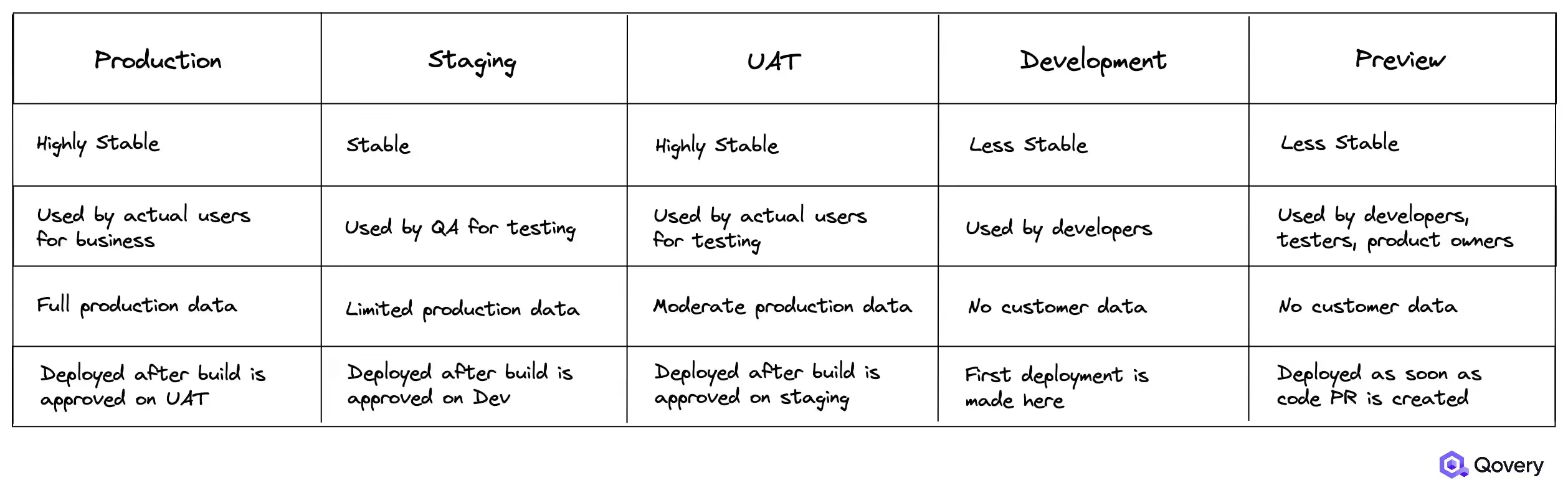
In this article, we mentioned various deployment environments, including Production, Staging, UAT, Development, and Preview Environments. We also highlighted the potential use cases for each of these environments. Here is a quick comparison of all the environments.
Next Steps
Qovery provides a super-efficient DevOps tool with all the powerful features you want to see when it comes to deploying on AWS. Through Qovery, it's very simple to create and deploy on-demand environments on AWS. Whether it is Production, Staging, UAT, Development, or Preview Environments, you can create one with few clicks. Not only it is fast but it provides developers, testers, and DevOps engineers with an outstanding workflow for software updates.
Let’s check out our quick guide to deploying multiple environments on AWS with Qovery.
Remember, you could get your first environment on Qovery for free so don’t hold back, and let’s try your first environment deployment!


.svg)
.svg)
.svg)

Suggested articles


At enterprise scale, managing provider-specific Kubernetes YAML across multiple clouds creates crippling configuration drift and operational toil. By adopting an agentic Kubernetes management platform, infrastructure teams abstract cloud-specific configurations (like ingress controllers and storage classes) into a single, declarative intent that automatically reconciles across 1,000+ clusters.

To stop GPU costs from destroying SaaS margins, teams must transition from static to consumption-based infrastructure by utilizing Karpenter for dynamic provisioning, maximizing hardware density with NVIDIA MIG, and leveraging Qovery to tie scaling directly to business metrics.
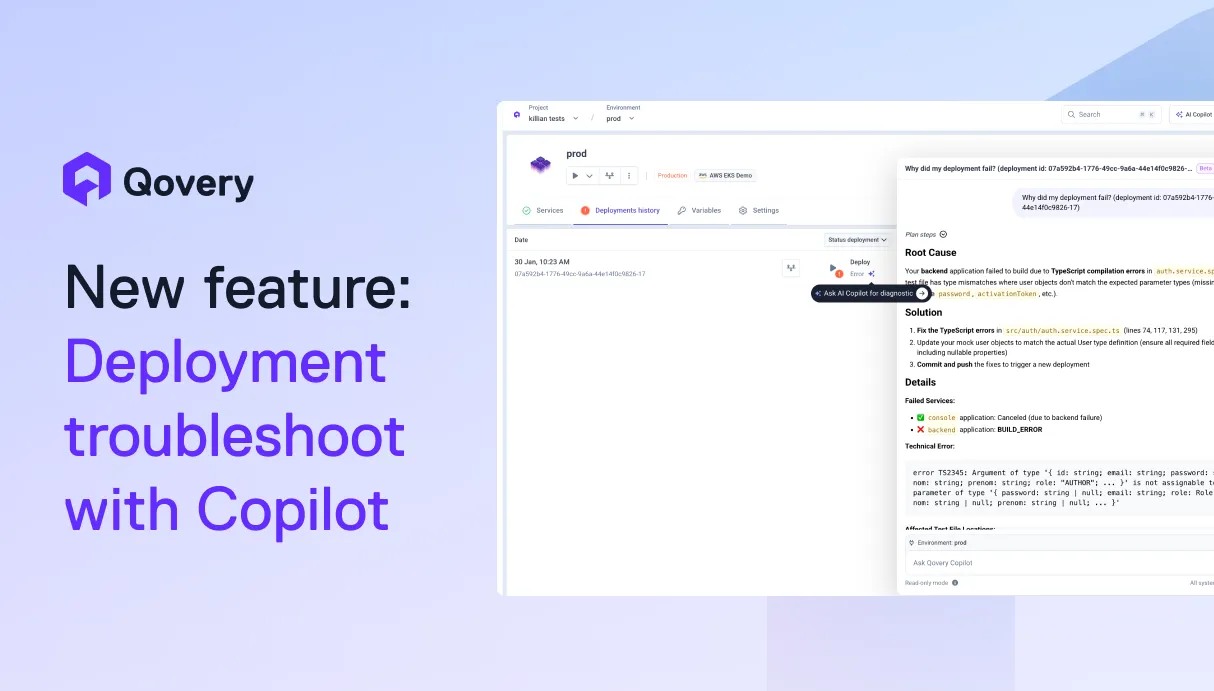
AI is helping developers write more code, faster than ever. But writing code is only half the story. What happens after? Building, deploying, debugging, scaling. That's where teams still lose hours.We're building Qovery for this era. Not just to deploy your code, but to make everything that comes after writing it just as fast.



By adopting GitOps and utilizing management platforms like Qovery, fintech teams can automatically generate DORA-compliant audit trails, transforming regulatory compliance from a manual, time-consuming chore into an automated, native byproduct of their infrastructure.
Kubernetes success is determined by Day 2 execution, not Day 1 deployment. While migration is a bounded project, maintenance is an infinite loop that often consumes 40% of senior engineering capacity. To protect margins and velocity, enterprises must transition from manual toil to agentic automation that handles scaling, security, and cost.
Day-0 is planning, Day-1 is deployment, and Day-2 is the infinite lifecycle of maintenance. While Day-0/1 are foundational, Day-2 is where enterprise operational debt accumulates. At fleet scale (1,000+ clusters), managing these differences manually is impossible, requiring agentic automation to maintain stability and eliminate toil.


.webp)