


Top 10 GitHub actions alternatives: stop optimizing for "price per minute"


Key Points:
- Don't Buy Minutes, Buy Velocity: If a cheaper runner saves you $50/month but causes developers to wait 10 extra minutes per build, you have lost money.
- Escape the "Maintenance Tax": "Free" self-hosted runners aren't free. They cost expensive engineering hours to patch, scale, and debug.
- Focus on Cloud Waste: The biggest cost isn't the runner; it's the resources the runner spins up. Platforms that automatically shut down preview environments save far more than any runner discount.
GitHub Actions has been the default choice for years. But with the announcement of new platform fees for self-hosted runners, the math has changed.
For DevOps teams, the knee-jerk reaction is to find a provider that is fractionally cheaper than GitHub’s rates. This is the wrong move.
This guide evaluates the 10 best GitHub Actions alternatives, categorizing them not by "who is cheapest," but by how they actually save you money: through Automation, Speed, or Control.
Environment & Deployment Automation (The "ROI" Upgrade)
GitHub Actions is a script runner. It doesn't care if you leave a massive database running all weekend. These tools replace the "CD" (Deployment) side of Actions with a platform that actively manages your costs.
1. Qovery (DevOps Automation Platform)
Qovery is the best alternative for teams who use GitHub Actions for deployments. It fundamentally shifts the cost model from "Paying for Minutes" to "Paying for Value."
The Pricing Reality:
Let's be transparent: Qovery is not the cheapest option if you just look at "cost per compute minute." If you want the absolute lowest CPU price, rent a bare-metal server.
However, Qovery is often the cheapest option for Total Cost of Ownership.
Pros:
- Slash Cloud Waste (The "Zombie" Killer): GitHub Actions scripts often leave Preview Environments running 24/7. Qovery’s TTL (Time-to-Live) and auto-shutdown features automatically turn off non-production environments at night/weekends. This saves ~60% on your AWS/GCP bill, which dwarfs any difference in runner pricing.
- Zero Maintenance Tax: You stop paying engineers $80/hour to debug actions-runner-controller or fix broken Helm charts. Qovery manages the entire delivery pipeline.
- Developer Self-Service: Developers get Ephemeral Environments automatically on every PR. No complex YAML scripting required.
Cons:
- Not a General CI: Qovery handles the "Deploy" and "Run" stages. You might still use a lightweight CI tool for running unit tests.
Qovery vs. The "Cheap Runner"
- Cheap Runner: You save $0.005/minute. You spend $1000/month on engineering maintenance. You waste $500/month on idle staging environments.
- Qovery: You pay a platform fee. You spend $0 on maintenance. You save $500/month on idle cloud resources.

Pure CI Specialists (The "Speed" Upgrade)
If your primary cost driver is Developer Waiting Time (e.g., waiting 40 minutes for a monolith test suite), these tools save money by being drastically faster than GitHub.
2. CircleCI
The industry standard for raw speed and parallelism.
Pros:
- Test Splitting: Automatically splits tests across parallel containers to cut build times by 50-70%.
- Resource Classes: Granular control over CPU/RAM allows you to pay exactly for what you need, rather than generic T-shirt sizes.
Cons:
- Credit Complexity: Their pricing model is usage-based and can get expensive if you aren't careful with resource classes.
3. Depot
A newer player specifically focused on Docker Build Speed.
Pros:
- Native Caching: Uses persistent SSDs to cache Docker layers instantly, often making builds 10x faster than GitHub Actions.
- Cost Effective: Because builds finish in seconds rather than minutes, you pay for less time overall, even if the rate is higher.
Cons:
- Niche: It’s excellent for Docker builds, but you still need an orchestrator for other tasks.
4. Buildkite
A hybrid model where you provide the infrastructure.
Pros:
- Bring Your Own Compute: You can run agents on AWS Spot Instances (which are 90% cheaper than On-Demand), significantly lowering the raw compute bill.
- Security: Code never leaves your network.
Cons:
- Ops Burden: You are back to managing the agents yourself. If an agent goes down, you fix it.
Integrated DevOps (The "Consolidation" Upgrade)
These tools offer an "All-in-One" alternative to GitHub, often bundling Code, CI, and CD together.
5. GitLab CI
The biggest direct rival.
Pros:
- Unified Data Model: Everything is in one place. If you are already paying for GitLab Premium ($29/user), using their CI feels "free" (though compute is still capped).
Cons:
- The Seat Tax: As discussed in other pricing guides, GitLab’s per-user pricing is very high. You pay for "seats" even for users who rarely deploy.
6. Harness
Focused on enterprise governance and "Continuous Delivery" rather than just CI.
Pros:
- Intelligence: Uses AI to verify deployments and rollback automatically if costs spike or errors occur.
Cons:
- Enterprise Price Tag: Harness is generally much more expensive than GitHub Actions and is aimed at Fortune 500s.
Code-First & Open Source (The "Freedom" Upgrade)
7. Jenkins
The free, open-source automation server.
Pros:
- No License Cost: Truly free to download and use.
- No "Per Minute" Fee: You only pay for the underlying infrastructure.
Cons:
- The Highest TCO: "Free" software requires the most expensive maintenance. You will likely need a full-time engineer just to manage Jenkins at scale.
Read more: Top Jenkins alternatives
8. Dagger
A programmable CI/CD engine that runs in containers.
Pros:
- Portable: Write pipelines in Go/Python/TypeScript. Run them locally or on any CI provider.
- No Lock-in: You are not tied to a specific vendor's YAML syntax.
Cons:
- Learning Curve: Requires developers to code their pipelines, not just configure them.
9. Woodpecker CI
A community fork of Drone CI.
Pros:
- Container Native: Every step is a container. Very clean and easy to manage.
- Open Source: Free and community-driven.
Cons:
- Smaller Ecosystem: Fewer plugins and integrations than GitHub or Jenkins.
10. TeamCity
JetBrains' powerful CI server.
Pros:
- Visual Chains: Excellent handling of complex build chains and dependencies.
- Pre-Tested Commits: Runs builds before checking in code, keeping the main branch green.
Cons:
- Agent Licensing: You pay per build agent, which can limit scalability if you have bursty workloads.
Comparison: GitHub Actions vs. The Strategic Alternatives
Conclusion: Matching the Tool to the Goal
The upcoming GitHub pricing change is forcing teams to audit their spend. But if you look only at the "price per minute," you miss the forest for the trees.
- Don't switch to a "cheaper runner" if it means hiring another engineer to manage it.
- Don't stay on GitHub if your "free" self-hosted runners are about to cost you thousands in platform fees.
The Strategic Move:
Keep a simple CI tool (like basic GitHub Actions or CircleCI) for running unit tests. But move your heavy lifting—deployments, preview environments, and database management - to Qovery.
You might pay a platform fee, but you will stop paying the Maintenance Tax and the Cloud Waste Tax. That is where the real ROI lies.


.svg)
.svg)
.svg)

Suggested articles


At enterprise scale, managing provider-specific Kubernetes YAML across multiple clouds creates crippling configuration drift and operational toil. By adopting an agentic Kubernetes management platform, infrastructure teams abstract cloud-specific configurations (like ingress controllers and storage classes) into a single, declarative intent that automatically reconciles across 1,000+ clusters.
To stop GPU costs from destroying SaaS margins, teams must transition from static to consumption-based infrastructure by utilizing Karpenter for dynamic provisioning, maximizing hardware density with NVIDIA MIG, and leveraging Qovery to tie scaling directly to business metrics.
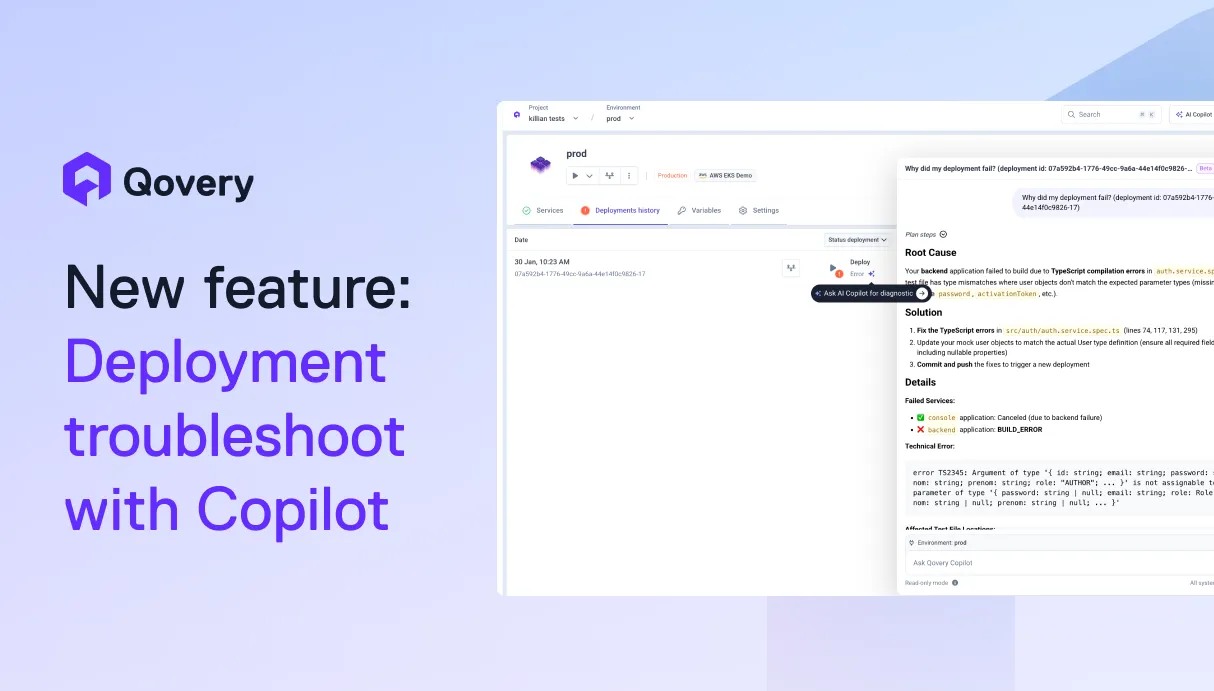
AI is helping developers write more code, faster than ever. But writing code is only half the story. What happens after? Building, deploying, debugging, scaling. That's where teams still lose hours.We're building Qovery for this era. Not just to deploy your code, but to make everything that comes after writing it just as fast.



By adopting GitOps and utilizing management platforms like Qovery, fintech teams can automatically generate DORA-compliant audit trails, transforming regulatory compliance from a manual, time-consuming chore into an automated, native byproduct of their infrastructure.
Kubernetes success is determined by Day 2 execution, not Day 1 deployment. While migration is a bounded project, maintenance is an infinite loop that often consumes 40% of senior engineering capacity. To protect margins and velocity, enterprises must transition from manual toil to agentic automation that handles scaling, security, and cost.
Day-0 is planning, Day-1 is deployment, and Day-2 is the infinite lifecycle of maintenance. While Day-0/1 are foundational, Day-2 is where enterprise operational debt accumulates. At fleet scale (1,000+ clusters), managing these differences manually is impossible, requiring agentic automation to maintain stability and eliminate toil.



.webp)